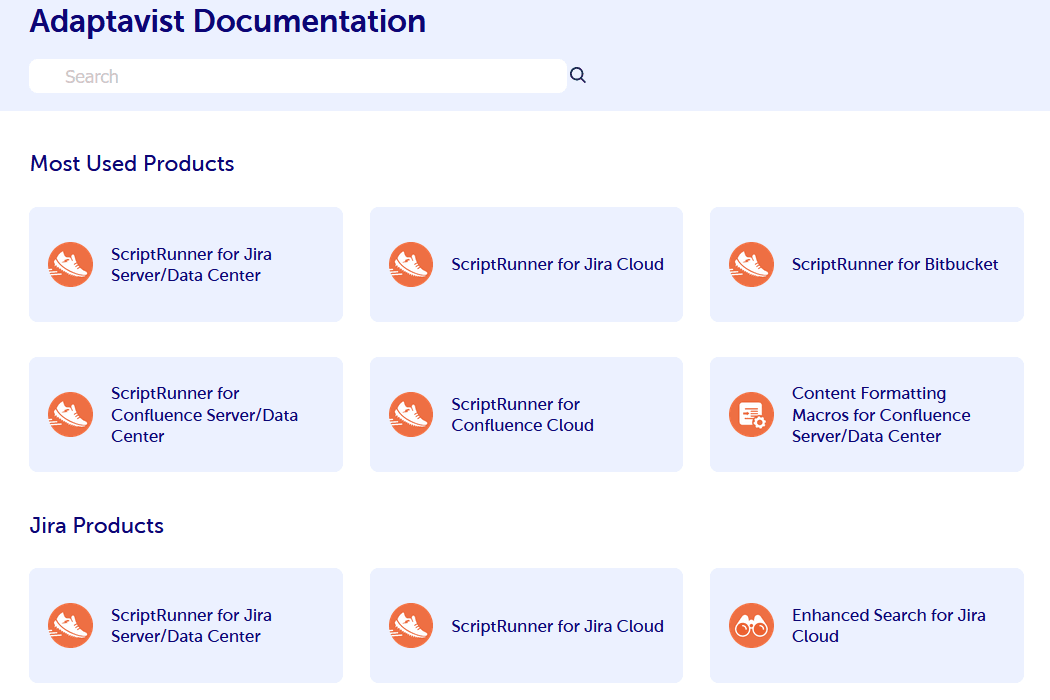
Adaptavist's documentation was scattered across 25+ apps, 6 sites, and 3 different platforms. It was so bad that documentation was one of the top five reasons customers canceled their licenses. By March 2021, I'd consolidated everything into a single Confluence instance with Scroll Viewport, and documentation had become a top-5 reason customers chose to buy – and stay. Here's what that migration actually looked like.
The Documentation Problem: 25+ Apps, 6 Sites, 3 Platforms
When I inherited Adaptavist's documentation landscape in 2018, "fragmented" was being generous. The company had grown through a combination of organic product development and acquisitions, and the documentation had grown with it – in every direction at once.
Twenty-five-plus apps. Six different sites. Three different documentation platforms. Some products had decent docs on one platform. Others had outdated docs split across two. A few had docs that contradicted each other depending on which site you landed on. There was no consistent navigation, no unified search, no shared style guide, and no clear ownership model.
This wasn't just an internal annoyance. It was a business problem.
How Fragmented Documentation Kills Software Sales
Here's something that doesn't get talked about enough in product companies: documentation is a sales tool. Prospective customers evaluate your docs before they buy. Technical evaluators read your API references. Administrators check your configuration guides. Decision-makers scan your release notes to understand your roadmap velocity.
At Adaptavist, the documentation was doing the opposite of selling. Prospects would find incomplete docs and conclude the product was incomplete. They'd find conflicting information across sites and lose confidence in the company's attention to detail. They'd search for something, get no results on one site, and not know to try a different site.
I heard this directly from the sales team. "Documentation came up as a concern in the last three deals." That's not a documentation problem – that's a revenue problem.
Customer satisfaction was taking a hit too. Existing users struggled to find what they needed, which drove support ticket volume up and satisfaction scores down. Every documentation failure created work for someone else in the organization.
Evaluating Documentation Platforms: Sphinx, Antora, and Confluence
I didn't start with a predetermined answer. The documentation could have lived on any number of platforms, and I needed to find the right one – not just the familiar one.
Testing Sphinx for Atlassian App Documentation
Sphinx is a solid documentation tool, especially popular in the Python ecosystem. It generates static sites from reStructuredText or Markdown source files. I evaluated it for its versioning capabilities, its theming flexibility, and its docs-as-code workflow that would appeal to Adaptavist's engineering teams.
The tradeoffs became clear quickly. Sphinx works beautifully when you have a small number of products with engineering teams that are willing to maintain docs alongside code. But with 25+ apps across multiple teams, the docs-as-code approach would create a maintenance bottleneck. Not every team had the same level of enthusiasm for writing documentation, and requiring Git workflows for doc updates would slow down the teams that were already contributing content through simpler tools.
Testing Antora for Multi-Product Documentation
Antora was a stronger contender. It's designed specifically for multi-repository, multi-version documentation – exactly the kind of complexity Adaptavist had. Each product team could maintain their own docs in their own repo, and Antora would aggregate everything into a unified site.
The architecture was appealing, but the operational reality gave me pause. Antora requires a specific directory structure in each repository, a build pipeline to aggregate and publish, and enough technical familiarity across all contributing teams to maintain the setup. For a smaller number of products with technically sophisticated doc contributors, it would've been a strong choice. For 25+ apps with varying levels of documentation maturity and contributor technical skill, it added complexity where I needed to reduce it.
Recommending Confluence with Scroll Viewport
I landed on consolidating everything into a single Confluence instance published through Scroll Viewport. This wasn't the flashiest option. It wasn't the most technically elegant. But it was the right one for Adaptavist's specific situation.
Here's why. Confluence was already deeply embedded in Adaptavist's workflow. Every employee knew how to use it. The barrier to contributing documentation was as low as it could get – open a page, type, publish. Scroll Viewport added the presentation layer that Confluence natively lacks, transforming internal wiki content into polished, customer-facing documentation with custom theming, navigation, and versioning.
The consolidation also meant one search index across all products, one navigation hierarchy, one consistent style, and one place for customers to look. That alone solved half the problem.
I want to be honest about the tradeoffs. Confluence isn't a perfect documentation platform. It has limitations around code formatting, version management, and page organization at scale. Scroll Viewport mitigates some of these, but it adds another layer of complexity and another vendor dependency. I chose this path because the operational benefits – contributor accessibility, organizational familiarity, reduced maintenance burden – outweighed the technical compromises.
The Confluence Documentation Migration Process
Migrating 25+ apps' worth of documentation from three different platforms into a single Confluence instance was not a quick project. It took the better part of three years, from 2018 to early 2021, and it required as much organizational work as technical work. Part of why it took three years was that this wasn't my full-time job – I was running multiple teams and delivering a lot of other work. This was important, but it was only a portion of what I was doing. Part of those three years was doing the discovery and working with stakeholders to select the documentation platform. Each option – Sphinx, Antora, and Confluence – took a month or two to evaluate because I had to coordinate and check in with all the different teams to see what would be acceptable to them.
I also had to build the team to do the work. Adaptavist didn't have technical writers when I started this project in 2018. Despite having a large product portfolio, all of the documentation was written by the engineers, and it showed. They suffered from expert blindness – jumping from step one to step eight without realizing it. I built a team of technical writers from scratch who could handle the documentation and contribute microcopy into the products themselves. They helped facilitate the migration of content into Confluence after I selected the platform and built the templates. There's a staffing and team-building story here alongside the technical one.
Content Audit and Documentation Inventory
The first phase was understanding what we actually had. I inventoried every piece of documentation across all six sites and three platforms. This meant cataloging not just what existed, but its quality, accuracy, completeness, and ownership. Some docs were current. Some were years out of date. Some were duplicates with subtle differences. Some were orphaned pages that no one had looked at in years.
This audit was tedious but essential. You can't plan a migration without knowing what you're migrating – and more importantly, what you should leave behind. Not everything deserved to make the trip to the new platform.
Migration Sequencing and Team Coordination
I didn't migrate everything at once. That would've been chaotic and would've disrupted too many teams simultaneously. Instead, I sequenced the migration by product, prioritizing the apps with the worst documentation experiences and the highest customer impact.
Each migration involved working with the product team to review their existing content, identify gaps, update outdated material, and restructure pages for the new Confluence architecture. This was where the real value was created – not in the act of moving pages from one platform to another, but in the forced review and improvement that the migration enabled.
Building Confluence Templates and Style Standards
Consistency across 25+ products required structure. I developed Confluence page templates for common documentation types: getting started guides, configuration references, API documentation, release notes, and troubleshooting pages. These templates ensured that a customer reading docs for one product would have a familiar experience when switching to docs for another.
I also established a style guide that covered tone, formatting conventions, screenshot standards, and terminology. Getting 25+ product teams to write consistently is a challenge, and I won't pretend we achieved perfection. But the templates and style guide moved us from chaos to coherence, which was the goal.
Scroll Viewport and Scroll Workflows for Customer-Facing Documentation
Scroll Viewport transformed the Confluence content into something that looked and felt like professional product documentation. We also used Scroll Workflows to include different people in the editing and review process while ensuring quality standards were met. The technical writers always had final say and publication rights – engineers couldn't just publish on their own, because the documentation they wrote often needed improvement. Having specialists in the loop made a big difference in the overall quality. I worked with the design team to create a custom theme that matched Adaptavist's brand, configured the navigation to handle the breadth of the product catalog, and set up versioning so customers could access documentation for the specific version they were using.
The search configuration was particularly important. With 25+ products in one Confluence instance, search needed to be smart about context. A customer looking at ScriptRunner documentation shouldn't have to wade through results from other products. Scroll Viewport's faceted search capabilities handled this, but the configuration took careful planning to get right.
From Sales Objection to Top-5 Buying Reason
By March 2021, the transformation was complete. And the results went beyond what I expected.
Before this project, documentation was one of the top five reasons customers ended their Adaptavist licenses. People were literally churning because the docs were that bad. After the unification, documentation became one of the top five reasons customers chose to buy Adaptavist products – and chose to keep them. That's not a marginal improvement. That's a complete inversion, from churn driver to selling point.
One customer's feedback captured it well – they praised the "honest" approach to documentation. I think that honesty mattered because it was real. We didn't hide limitations or pretend edge cases didn't exist. We documented things as they actually were, including workarounds for known issues and transparent notes about what wasn't supported. Customers responded to that because it built trust.
Support ticket volume related to documentation questions dropped as well. When customers can find answers themselves, they don't need to ask. That freed up the support team to focus on genuine technical issues rather than serving as a human search engine for information that should have been findable.
What Documentation Consolidation Actually Requires
If you're facing a similar documentation fragmentation problem, here's what I'd want you to know. The technical migration is maybe 30% of the work. The other 70% is organizational: getting buy-in from product teams, establishing governance models, building contributor habits, and maintaining momentum across a multi-year effort.
You also need to accept that the first version won't be perfect. Some migrated docs will have issues. Some templates won't fit every product's needs. Some teams will resist the new process. The goal isn't perfection at launch – it's building a system that improves over time and is easier to maintain than what it replaced.
Frequently Asked Questions
How long does a documentation platform migration take for 25+ products?
In our case, about three years from initial audit to completion. But context matters: this wasn't my full-time focus, I had to evaluate three different platforms (each taking a month or two of stakeholder coordination), and I had to hire and build a technical writing team from scratch – Adaptavist didn't have one. The technical migration itself is faster than three years. If you already have the team and this can be a full-time focus, six to twelve months is definitely reasonable for a serious multi-product documentation migration.
Is Confluence a good platform for customer-facing product documentation?
Not out of the box. Confluence is designed as an internal collaboration tool, and its default presentation isn't suitable for customer-facing documentation. But combined with Scroll Viewport (or similar publishing tools), it becomes a viable option – especially if your organization already uses Confluence internally. The key advantage is low contributor friction: anyone who can edit a Confluence page can contribute to your documentation. The tradeoff is that you need an additional tool to handle the presentation layer.
How do you maintain documentation quality across 25+ product teams?
Templates, style guides, and ownership models. Templates ensure structural consistency. Style guides ensure tonal and formatting consistency. Ownership models ensure someone is accountable for every section of documentation. Even with all three, you'll have variation in quality – the goal is to set a floor that's high enough and make it easy for teams to meet it.
Related Case Studies
- Atlassian Implementation for a Health Insurance Startup: From 100 to 30,000 Members – Another project where information architecture decisions directly affected customer experience and satisfaction.
- Defining Product Strategy for the Adaptavist Library – How I brought clarity to a different Adaptavist initiative using systems thinking and stakeholder alignment.
- Enterprise Confluence Upgrade for 150,000 Healthcare Professionals – A deep technical Confluence engagement with 500,000+ pages at stake.