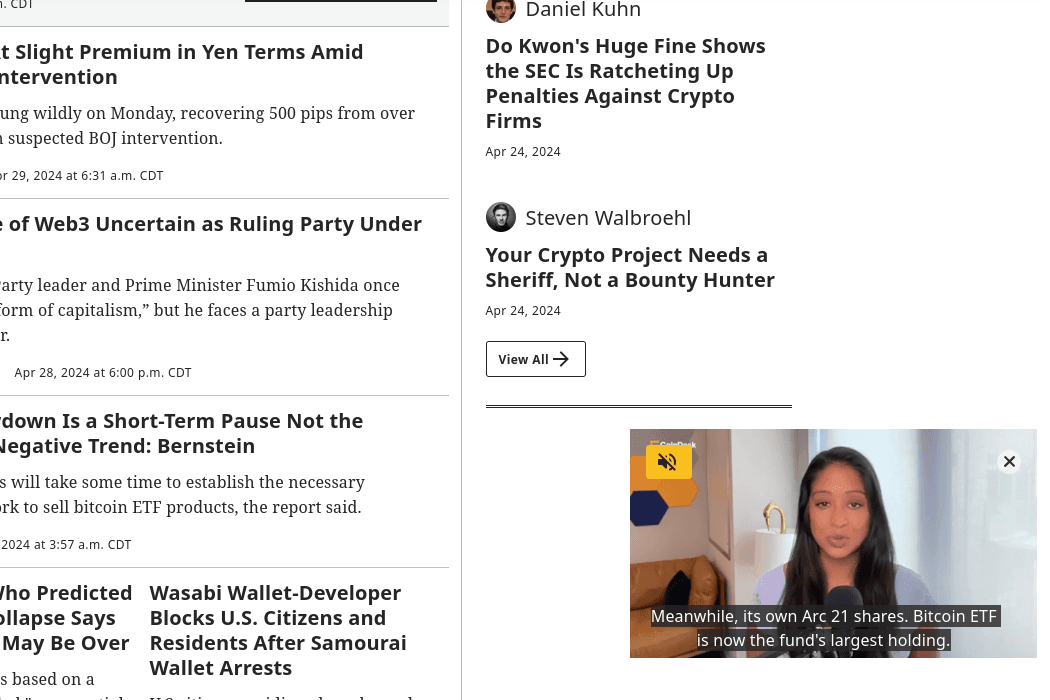
CoinDesk's video player was losing money on every page load. Ad impressions were running 70-80% below video play counts, which means the ads that were supposed to monetize video content weren't even registering as viewable. The player had sizing problems, scrolling problems, and basic usability problems that compounded into a massive revenue gap.
I identified the issues, defined the fixes, and managed the project through implementation. The result: ad impressions went from 20-30% of play counts to 30-50% above play counts – a dramatic swing – along with new mid-roll ad inventory that didn't exist before.
The Video Ad Viewability Problem CoinDesk Faced
To understand why this mattered so much, you need to understand how video ad monetization works.
A video ad impression only counts, and only generates revenue, when the ad meets viewability thresholds defined by the Media Rating Council (MRC) and IAB standards. For video, that generally means at least 50% of the player's pixels are visible in the viewport for at least two consecutive seconds. If the player scrolls out of view, if it's sized in a way that pushes it partially off-screen, or if the user never sees it at all, the impression doesn't count.
CoinDesk was playing videos. People were watching them. But the ad system was recording far fewer impressions than plays because the player implementation was failing viewability checks across multiple dimensions.
The gap was stark: for every 100 video plays, only 20-30 ad impressions were being recorded. That's 70-80% of potential ad revenue evaporating due to technical implementation issues.
Diagnosing Why Video Ad Impressions Were 30-50% Below Plays
I dug into the player implementation and found a cluster of interrelated problems. No single issue explained the full gap. It was the combination that made it so damaging.
Misaligned Player Sizing Across Devices
The video player's dimensions weren't properly responsive. On certain viewport sizes, the player would render with misaligned proportions. Sometimes it would be partially clipped. Other times it would have excessive padding that pushed it partially below the fold on page load. On mobile devices, the sizing issues were worse. The player skin (controls, progress bar, chrome) wasn't optimized for touch interfaces, and the overall dimensions often didn't match the available screen width cleanly.
Every pixel of the player that sits outside the viewport is a pixel that works against viewability measurement. When the player renders at a size that's partially off-screen, even by 20 pixels, it can fail the 50% visibility threshold.
No Pause-When-Out-of-View Behavior
This was the most impactful single issue. When a user scrolled past the video player, the video kept playing. It just played to an empty part of the page that nobody was looking at.
This creates a cascade of problems for ad monetization. The video plays, which triggers ad requests. But the player isn't in the viewport, so the ad fails viewability checks. The impression doesn't count. Meanwhile, the user has already scrolled past and has no idea a video is playing somewhere above them. The video completion counts as a play, but the ad revenue is zero.
Without pause-on-scroll behavior, every user who scrolled past the player was generating a play with no corresponding ad impression. Given how much content appears below video embeds on article pages, this was happening constantly.
Poor Floating Player Implementation
CoinDesk had a floating player feature (sometimes called a sticky player or picture-in-picture), but its positioning was inconsistent. On some page layouts it would overlap content. On others it would appear in awkward positions relative to the scroll state. These inconsistencies meant the floating behavior, which is specifically designed to maintain viewability when users scroll, wasn't reliably solving the problem it was supposed to solve.
Unmute Discoverability Issues
Many video players autoplay muted per browser policies. Getting users to unmute is critical for engagement and completion rates, which directly affect ad delivery. CoinDesk's unmute button was small and poorly positioned. Users who might have engaged with the audio, and therefore watched longer, simply didn't notice the option to unmute. Lower completion rates meant fewer mid-roll ad opportunities and lower overall engagement metrics.
The Product Roadmap for Video Player Optimization
I built a prioritized roadmap that addressed each issue based on its estimated revenue impact. Here's what we shipped.
Pause Controls for Off-Screen Video Playback
The highest-priority fix. We implemented detection that pauses video playback when the player scrolls out of the viewport and resumes when the player returns to view.
This immediately stopped the biggest source of wasted ad requests. No more videos playing to empty space. No more ad impressions failing viewability because the player was below the fold while the user read an article two screens down.
The implementation had nuance. We needed to define the right threshold for "out of view" (we used the same 50% pixel visibility that ad measurement uses), handle edge cases like rapid scrolling and tab-switching, and make sure the pause/resume behavior felt smooth rather than jarring.
Standardized Mobile-First Player Skin
We rebuilt the player's control skin with mobile as the primary design target. Touch-friendly hit areas for play/pause, scrubbing, and volume. Consistent sizing across viewport widths. Clean aspect ratio handling that prevents the rendering misalignment issues.
The mobile-first approach actually fixed desktop too. A skin designed for touch constraints works fine with a mouse. A skin designed for mouse precision fails on touchscreens. By starting with the harder constraint, we got a solution that worked everywhere.
Prominent Unmute Button and Audio Controls
We redesigned the unmute affordance to be significantly more visible. Larger button. Higher contrast. Positioned where users' eyes naturally go when watching video. This sounds like a minor UX polish. In terms of revenue impact, it was substantial.
Users who unmute watch longer. Users who watch longer see more of the video. Longer watch sessions mean higher completion rates. Higher completion rates mean more completed ad slots, including mid-roll positions. The unmute button redesign had a direct measurable effect on average view duration.
Automated Closed Captioning and Transcript Generation
We added automated captioning to all video content, along with full transcript generation. This served multiple purposes.
Accessibility is the obvious one. Captioned video is usable by deaf and hard-of-hearing users, and it's better for everyone in sound-off environments (offices, public transit, late-night browsing).
But captions also increase engagement for all users. Studies consistently show that captioned video holds attention longer, even among hearing users. Longer attention means higher completion rates, which means better ad performance. The transcripts also gave us SEO value: full-text content associated with every video, indexable by search engines, creating new entry points for organic traffic.
Refined Floating Player Positioning
We overhauled the floating player behavior to be consistent and predictable across all page layouts. The floating player now activates at a defined scroll threshold, positions itself in a consistent screen location that doesn't overlap critical content, and maintains proper sizing for viewability measurement.
The floating player is the safety net for viewability. When a user scrolls past the inline player position, the floating player keeps the video visible and therefore keeps ads viewable. Getting this right was essential for capturing the ad impressions that would otherwise be lost to scrolling.
Google Live Video Integration
We integrated with Google's live video features, which improved discoverability for live-streamed content in search results. CoinDesk regularly produces live video during major market events and conferences. Proper structured data for live video means these streams can appear in Google's live video carousels, driving additional viewership without additional content production cost.
Video Player Optimization Results: Viewability and Revenue Impact
The combined effect of these changes was significant and measurable.
Ad impressions flipped from a fraction of plays to above them. Before the fixes, ad impressions were running at just 20-30% of play counts. After, ad impressions were consistently 30-50% above play counts. That's not just closing a gap – it's a complete reversal, because viewable completions trigger multiple ad slots per play.
Completion rates reached 70-80%. Users who started videos were finishing them at high rates, driven by better mobile controls, visible unmute options, captions, and floating player behavior that kept videos in view.
Mid-roll ad inventory became viable. With completion rates this high, mid-roll ad placements (ads that appear partway through the video) became a realistic revenue stream. At the old completion rates, mid-roll would have been too disruptive. At 70-80% completion, there's enough engagement to support mid-roll without killing the user experience.
Why Video Player UX Is a Revenue Problem, Not Just a Design Problem
This project is a clear example of something I see constantly in digital media product work: UX problems that look cosmetic are actually revenue problems.
A misaligned player looks like a design bug. A missing pause-on-scroll behavior seems like a minor feature gap. A small unmute button feels like a nitpick. But when you trace each issue through to its ad monetization impact, the cumulative revenue loss is enormous.
Product managers in ad-supported media need to be fluent in how viewability measurement works, how ad serving pipelines interact with player behavior, and how seemingly minor UX decisions compound into major revenue effects. The video player project wasn't glamorous work. There's no flashy feature to demo. But it directly improved revenue by fixing the gap between content that was being produced and money that should have been earned from it.
Frequently Asked Questions
How do you improve video ad viewability on a news website?
Start by measuring the gap between video plays and recorded ad impressions. If impressions are significantly below plays, the player has viewability problems. The most common culprits are: videos playing when out of viewport (fix with pause-on-scroll), player sizing that pushes pixels off-screen (fix with responsive design), and lack of floating/sticky player behavior (fix with a well-positioned floating player that activates on scroll). Each fix closes part of the gap.
What is a good video completion rate for publisher video content?
70-80% completion rates are strong for publisher video, though this varies with video length and content type. Short news clips (under 3 minutes) should target the higher end. Longer features will naturally see lower completion. The key factors that improve completion are: visible unmute buttons, closed captions, pause-on-scroll so users don't lose their place, and clean mobile controls that don't frustrate touch users.
How does video player design affect ad revenue?
Every aspect of video player design affects whether ads meet viewability thresholds. Player sizing determines how many pixels are in-viewport. Scroll behavior determines whether ads play to visible users. Completion rates determine how many ad slots (pre-roll, mid-roll, post-roll) actually get served. Mobile UX determines whether users engage or abandon. A well-optimized player can double the effective ad impressions per video play compared to a poorly implemented one.
Related Case Studies
- CoinDesk Replatform: Migrating from Arc XP to Sanity and Vercel –The platform migration that gave us the engineering flexibility to ship player improvements faster
- Revitalizing CoinDesk's Cryptocurrency Price Pages –Another case where strategic product thinking outperformed a feature-for-feature approach